
HLS Master Playlist Generator
Processed locally in your browser — no upload, no privacy risk
Click or drag a file here
Accepts .m3u8 files — select all of your bitrate playlists at once
Processed locally in your browser — no upload, no privacy risk
Click or drag a file here
Accepts .m3u8 files — select all of your bitrate playlists at once
A typical multi-bitrate HLS folder looks like this:
master.m3u8          <- master playlist (generated by this tool)
360p/index.m3u8      <- media playlist: segments only, fixed bitrate
360p/seg-001.ts
720p/index.m3u8
720p/seg-001.ts
1080p/index.m3u8
1080p/seg-001.ts
The player requests master.m3u8 first, reads the #EXT-X-STREAM-INF entries, and picks one variant based on measured bandwidth and buffer health. It then fetches that variant's playlist and segments, switching down when the network degrades and back up when it recovers — that is adaptive bitrate streaming (ABR).
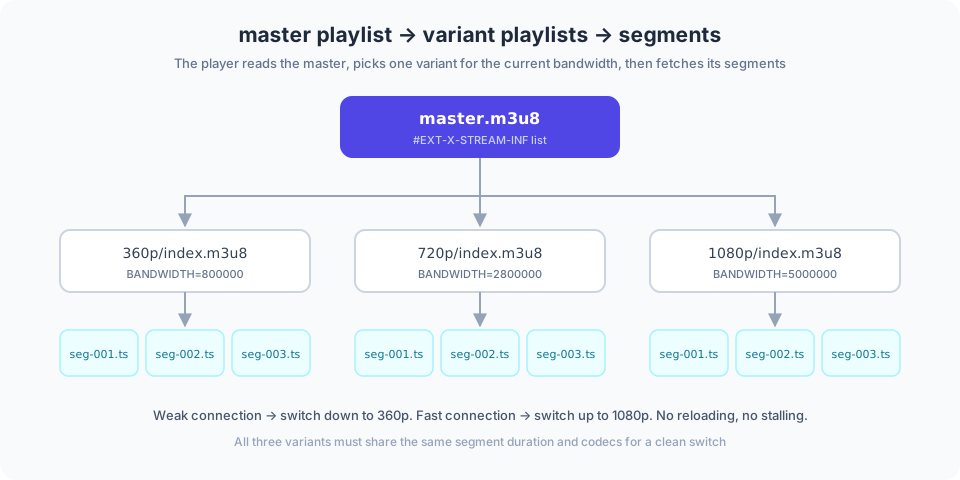
Figure 1: the master playlist points to variant playlists, which in turn list the media segments.
| Attribute | Required | Notes |
|---|---|---|
| BANDWIDTH | Yes | Peak bitrate in bit/s; this tool takes kbps and multiplies by 1000 |
| AVERAGE-BANDWIDTH | Optional | Average bitrate, helps players estimate more accurately |
| RESOLUTION | Recommended | Such as 1280x720, used for UI display and device filtering |
| CODECS | Recommended | RFC 6381 codec string, e.g. avc1.64001f,mp4a.40.2 |
| FRAME-RATE | Optional | Mainly distinguishes 24/30fps from 50/60fps |
| AUDIO | Optional | References an audio group ID defined in EXT-X-MEDIA |
#EXTM3U
#EXT-X-VERSION:3
#EXT-X-INDEPENDENT-SEGMENTS

#EXT-X-STREAM-INF:BANDWIDTH=800000,AVERAGE-BANDWIDTH=800000,RESOLUTION=640x360,CODECS="avc1.64001e,mp4a.40.2"
360p/index.m3u8

#EXT-X-STREAM-INF:BANDWIDTH=2800000,AVERAGE-BANDWIDTH=2800000,RESOLUTION=1280x720,CODECS="avc1.64001f,mp4a.40.2"
720p/index.m3u8
Variants are sorted by ascending bandwidth, a widely followed convention that also makes the file easier to review.
index.m3u8 plus a set of .ts segments).index.m3u8 files in — resolutions and bandwidth are inferred from the file names and playlists.720p/index.m3u8) and add CODECS if you know them.master.m3u8, then upload it alongside the three folders on your server..m3u8 files at once.EXT-X-MEDIA audio rendition.master.m3u8.All parsing and generation happen locally in your browser; playlist files are never uploaded. The tool never requests the URIs you enter, so internal or unpublished paths are safe to write.
Bandwidth is the value people get wrong most often. Use the figures below as a starting point, then adjust against real measurements.
| Resolution | Suggested BANDWIDTH (kbps) | Typical CODECS string | Where it fits |
|---|---|---|---|
| 426x240 | 400 | avc1.42c015,mp4a.40.2 | Very weak networks, thumbnail previews |
| 640x360 | 800 | avc1.42c01e,mp4a.40.2 | Mobile networks |
| 854x480 | 1400 | avc1.4d401f,mp4a.40.2 | Mobile plus WiFi |
| 1280x720 | 2800 | avc1.64001f,mp4a.40.2 | The usual home broadband default |
| 1920x1080 | 5000 | avc1.640028,mp4a.40.2 | WiFi and desktop |
| 3840x2160 | 16000 | hvc1.1.6.L120.B0,mp4a.40.2 | High bandwidth, 4K displays |
The
avc1.xxxxxxstrings follow RFC 6381, where the hex digits encode the H.264 profile and level. If you are unsure, start from the lower rungs — the player's bandwidth measurement decides which variant it actually settles on.
Content maintenance: this page is maintained and reviewed by the EZ Online Tools team; technical statements are checked against the specifications listed above. Last updated: 2026-10-16
Yes, completely free. No registration or sign-in required.
No. Everything runs locally in your browser; files never leave your device.
It depends on your device memory. Staying under 500MB per file is recommended.
Yes, on modern browsers such as Chrome and Safari. Smaller files are recommended.