
MOV to MP4 Converter
Runs locally in your browser — your MOV files never leave your device
Click or drag a file here
MOV / QT
Runs locally in your browser — your MOV files never leave your device
Click or drag a file here
MOV / QT
MOV is the container format Apple defined around QuickTime, and it is what iPhones, iPads, Macs and most digital cameras save by default. MP4 follows ISO/IEC 14496-14 and is the most widely accepted container for Windows, Android, smart TVs, editing software and video platforms.
Both containers can hold H.264 or H.265 video with AAC audio, but MOV files frequently use editing intermediate codecs such as ProRes or DNxHD. Those are large and poorly supported — the usual reason a clip plays fine on a Mac but reports "unsupported format" on an Android phone.
| MOV (QuickTime) | MP4 | |
|---|---|---|
| Origin | Apple / QuickTime | ISO standard |
| Typical video codecs | H.264, H.265, ProRes | H.264, H.265, AV1 |
| Compatibility | Best inside the Apple ecosystem | Almost everywhere |
| File size | Similar at equal codecs, huge with ProRes | Smaller |
| Typical use | iPhone recording, editing intermediates | Playback, sharing, uploads |
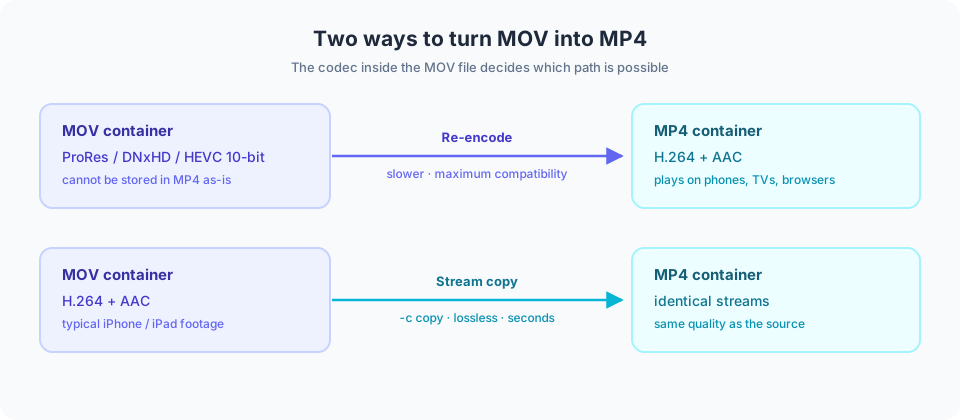
Figure 1: the codec inside the MOV decides the path — compatible streams are rewrapped, editing codecs are re-encoded.
-c copy and only rewraps the container. It usually finishes in seconds and the output is identical in quality to the source. Use it whenever the source is already H.264/H.265 with AAC, which covers almost all iPhone footage.If you are unsure, keep the default Fast mode: the tool attempts a lossless copy first and falls back to re-encoding automatically.
.mov file in (.qt is supported too).Conversion uses a WebAssembly build of FFmpeg inside your browser, so files are never uploaded and are cleared when the page closes. Because everything runs on your device, keep files under roughly 500MB on desktop and 100MB on mobile, and leave the tab in the foreground.
The ranges below reflect what we commonly observe in daily use, so you know what to expect. Actual speed depends on your device, browser version, source codec and disk speed — they are not guaranteed figures.
| Scenario | File size | Typical time |
|---|---|---|
| Fast mode (stream copy) | 50MB / 1080p | about 2–5 seconds |
| Fast mode (stream copy) | 500MB / 4K | about 10–30 seconds |
| Compatible mode (re-encode) | 100MB / 1080p | about 1–3 minutes |
| Compatible mode (re-encode) | 1GB / 4K | about 8–20 minutes |
Why the gap? A stream copy scales with file bytes, while re-encoding scales with pixels × duration — so for the same duration, higher resolutions take far longer.
Content maintenance: this page is maintained and reviewed by the EZ Online Tools team; technical statements are checked against the specifications listed above. Last updated: 2026-10-16
Yes, completely free. No registration or sign-in required.
No. Everything runs locally in your browser; files never leave your device.
It depends on your device memory. Staying under 500MB per file is recommended.
Yes, on modern browsers such as Chrome and Safari. Smaller files are recommended.