
title
subtitle
inputLabel
inputHint
settingsTitle
offsetHint
subtitle
inputHint
offsetHint
| Format | Full name | Characteristics | Typical use |
|---|---|---|---|
| SRT | SubRip | Plain text: index, timestamps, text — the simplest format | Desktop players, CapCut, Premiere, a convenient conversion hub |
| VTT | WebVTT | W3C standard with styling, positioning and comments | HTML5 <track>, web players, HLS/DASH subtitle tracks |
| ASS | Advanced SubStation Alpha | Fonts, colours, outlines, shadows and positioned effects | Fansub groups, bilingual and karaoke subtitles |
| SSA | SubStation Alpha | The predecessor of ASS with nearly identical syntax | Legacy releases and old subtitle files |
Timestamps differ too: SRT uses 00:00:01,000 with a comma, VTT uses 00:00:01.000 with a dot, and ASS/SSA uses 0:00:01.00 with two-digit centiseconds. Editing these by hand is error-prone, which is where this converter helps.
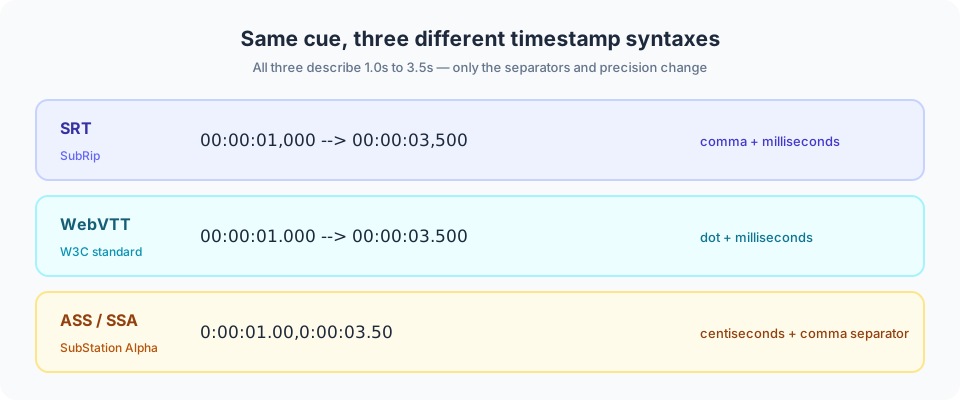
Figure 1: the same cue written in three formats — only the separators and precision differ.
<track> element supports WebVTT exclusively, so SRT must be converted first.The offset is a constant shift: the same number of seconds is added to (or subtracted from) every cue, so the spacing between subtitles never changes. It fixes fixed delays — if the video has 10 extra seconds of intro, enter +10.
If the drift grows larger towards the end, the two versions use different frame rates (typically 23.976fps vs 25fps) and require proportional rescaling rather than a shift. This tool supports constant offsets only.
Fonts, sizes, colours, outlines, positioning (\pos) and karaoke effects (\k) are capabilities unique to ASS/SSA:
If your goal is burning subtitles into the video, this site does not offer that yet — convert everything to SRT here first, then hand it to your editor or FFmpeg.
.srt, .vtt, .ass or .ssa file.Files are decoded as UTF-8 first, and the tool falls back to GB18030 when replacement characters appear, which covers most Simplified Chinese subtitles. All parsing and generation happen locally in your browser — nothing is uploaded or logged.
Check what your target format can actually carry before converting — this is where most surprises come from.
| Capability | SRT | WebVTT | ASS | SSA |
|---|---|---|---|---|
| Timestamps and text | ✓ | ✓ | ✓ | ✓ |
| Italic / bold | ✓ (player dependent) | ✓ | ✓ | ✓ |
| Fonts, colours, outlines | ✗ | ✓ (via CSS) | ✓ | ✓ |
| Positioning on screen | ✗ | ✓ | ✓ | ✓ |
| Karaoke / karaoke-style effects | ✗ | ✗ | ✓ | ✓ |
Native <track> support in browsers | ✗ | ✓ | ✗ | ✗ |
| Convertible in this tool | ✓ | ✓ | ✓ | ✓ |
Rule of thumb: VTT for web playback, SRT for editing software, ASS if you need to keep the effects.
Content maintenance: this page is maintained and reviewed by the EZ Online Tools team; technical statements are checked against the specifications listed above. Last updated: 2026-10-16
Yes, completely free. No registration or sign-in required.
No. Everything runs locally in your browser; files never leave your device.
It depends on your device memory. Staying under 500MB per file is recommended.
Yes, on modern browsers such as Chrome and Safari. Smaller files are recommended.